
Portable and CB
For operating away from the shack
- One log per activation, independent from the main one, so the outing does not get mixed up with your everyday log.
- Activity types: portable, mobile, SOTA, POTA, WWFF, IOTA, contest, special event and DX expedition.
- When you finish, you export the activation to ADIF with its type and grid.
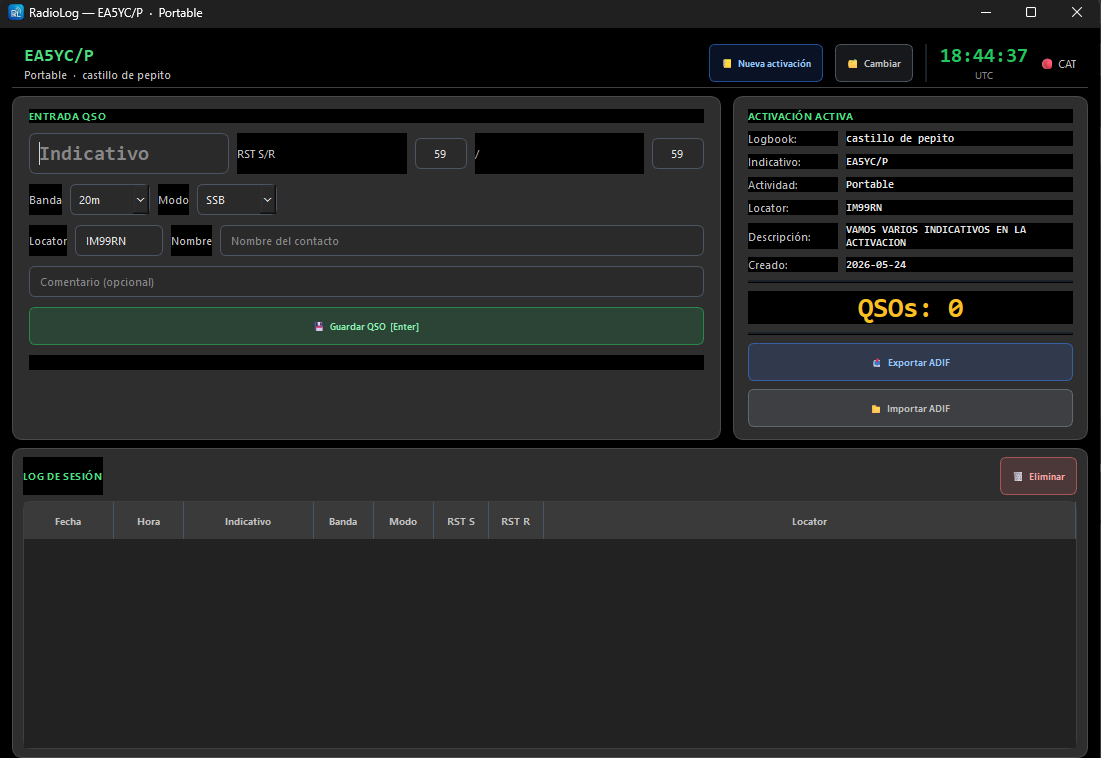
The Activation / Portable window.
What it includes
In detail
Activation
Name of the outing, /P callsign, type, grid and notes (the summit or park reference).
The same panel as ever
Callsign, reports, band and mode synced with CAT, grid, name and comment.
CB / 11 m logbook
A logbook of its own for the citizens band, with its 11 m band and its fields.
Digital modes on CB
FT8, FT4, FT2, RTTY and PSK31, with the right default report for each mode.
Export
ADIF of the activation, ready to upload to the SOTA, POTA or WWFF programmes.
Switch activation
Go from one outing to another without losing anything.
Getting started
In four steps
- Operation → Activation / PortableOr Operation → CB / 11 Metres for the CB logbook.
- New activationName, callsign, type, grid and notes.
- Log the QSOsJust like in the main logbook.
- Export to ADIFWhen the outing is over.
Try it, it's free
Windows 10 and 11, 64-bit. It installs in a minute and needs no registration.
⬇ Download RadioLog v4.1.0