
v4.0.6 · October 12, 2026
RadioLog Amateur Radio Logbook
Modern amateur radio software with logbook, DX Cluster, RigControl, contests, RTL-SDR auxiliary monitor and portable mode. A EA5YC product.
Free for amateur radio operators · No activation key or registration required · Windows 10/11 x64

Main screen with VFO, logbook, DX Cluster and auxiliary monitor.
Download RadioLog v4.0.6
Windows 10/11 64-bit installer. No dependencies — everything included.
Updating? Close RadioLog before running the installer. Your logbook and settings are kept.
Security note: RadioLog is currently distributed without a commercial code-signing certificate, so Windows SmartScreen may display "Unknown publisher". Always download RadioLog from this official website.
SHA-256: aab666ac806d8f55dd5dc37bb4196ba97dbb7b682d08286b16ecac6ff6a28e5a
Screenshots
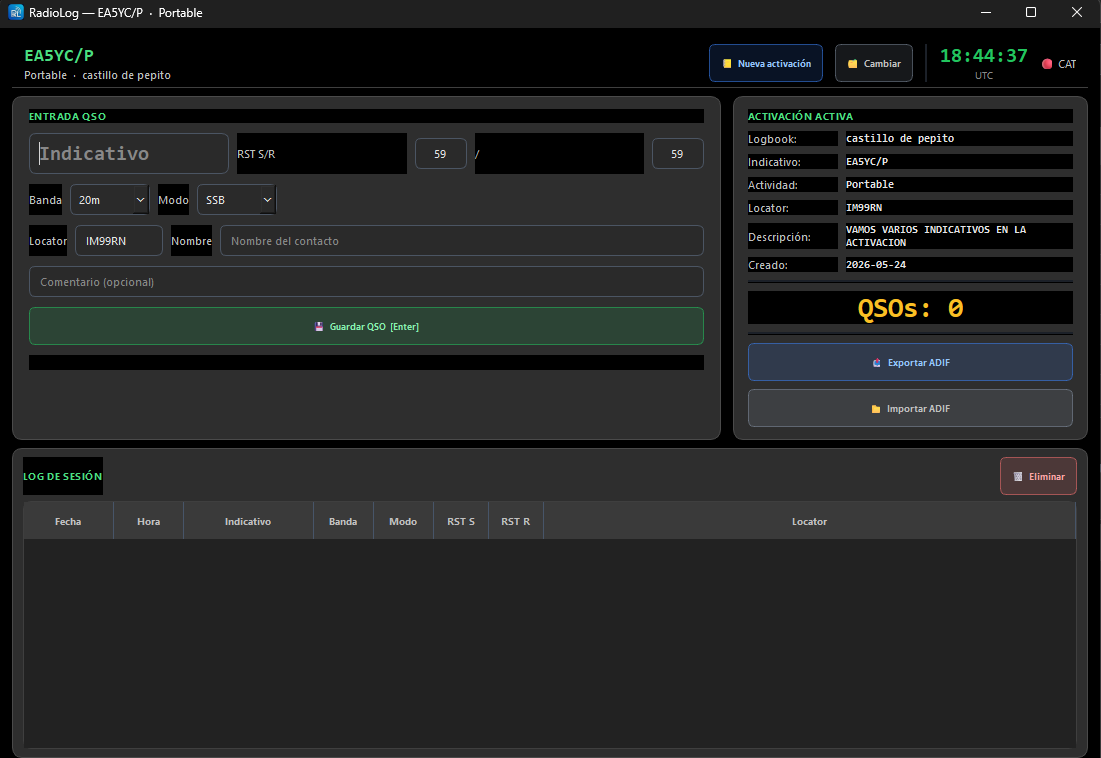
RadioLog in real use — logbook, RigControl, cluster and portable mode.
Operation and DX Cluster
Workflow focused on operating, logging and checking spots quickly.
Colour themes
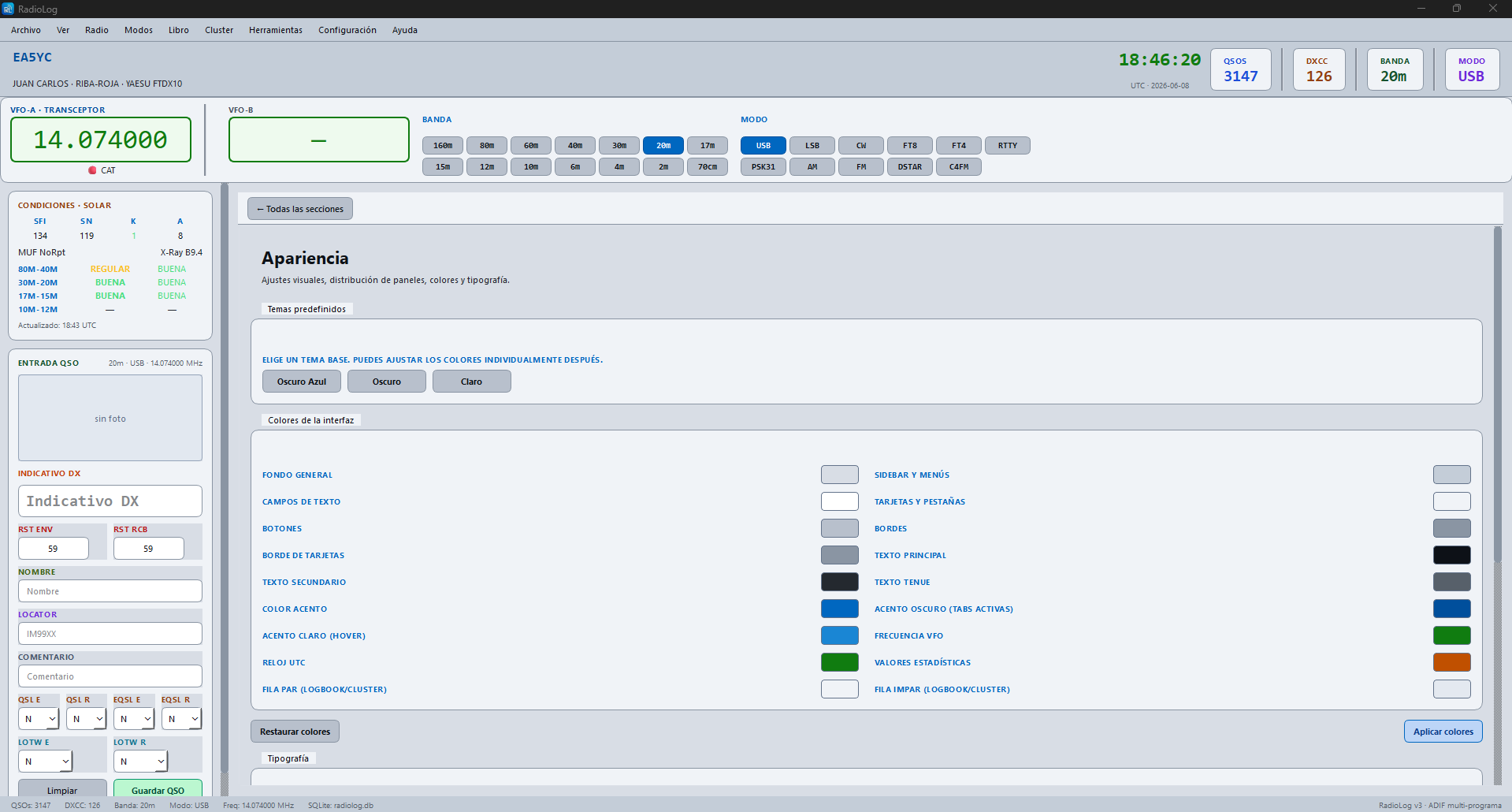
Three built-in themes and customisable accent colours.
What makes RadioLog different
Not just a logbook — a modern, modular suite built for real radio operation.
Q
Logbook
QSO entry, filters, search and full export: ADIF, eQSL and LoTW.
DX
DX Cluster
Real-time spots colour-coded by your logbook status — new, worked, confirmed.
CAT
RigControl
Integrated CAT with native Icom CI-V and Hamlib relay for WSJT-X/JTDX — no port conflicts.
🏆
Contests
Separate log, automatic scoring and Cabrillo/EDI export for HF and VHF contests.
RTL
Aux monitor
Integrated RTL-SDR monitor as visual/audio support during operation.
⛺
Portable mode
SOTA, POTA, WWFF, /P activations and independent CB/11m logbook.
What's in v4.0.6
Updated October 12, 2026 — CW Studio (beta), Light theme and a fix for the support code.
- ✓Main interface with VFO, bands, modes and operational panels.
- ✓Full logbook — ADIF, eQSL, LoTW, QRZ, ClubLog, HRDLog.
- ✓Integrated DX Cluster with spots colour-coded by logbook status.
- ✓CAT control + Hamlib relay for digital modes WSJT-X/JTDX.
- ✓Contest module: Cabrillo, EDI, automatic CQ-WW scoring and more.
- ✓Portable mode: SOTA, POTA, WWFF, /P and CB/11m logbook.
- ✓RTL-SDR auxiliary monitor.
- ✓Integrated manual in Spanish and English.
New in v4.0.6
- ✓Fix: the "I have donated" window now recognises the callsign you set in My station, so the support code can be pasted (for many users the field stayed disabled). Pasting a line with extra text around the code also works now.
- ✓CW Studio (beta): CW decoder and transmission in one window. It decodes several stations at once, sends text and F1–F8 macros (daily and contest sets), shows how far each station is from zero beat, and can tune your radio to the station you pick. Feature in testing — try it at low power with a proper interface.
- ✓New "CW & Digital" menu with a list of modes and links that you customise yourself; the old "Modes" menu is now called "Operation".
- ✓The Light theme is back: choose it in Settings → Appearance.
- ✓New radio profile FT-950-DATA: with the Yaesu FT-950, digital modes (FT8, FT4, JS8, PSK31…) now put the radio in USB/PKT instead of USB/RTTY. Choose it in Settings → Radio / CAT.
- ✓CAT: "Detect radio" now also tries 9600 and 4800 baud, and CAT ports are opened without pulsing the DTR/RTS lines, so radios with PTT or CW keying on RTS/DTR no longer click or key when RadioLog probes or connects.
- ✓New default CW macros (CQ, answer, report, details, close, QRL?), written in the settings fields so you can edit them.
- ✓Your callsign, name and QTH from My station now fill the {MYCALL}, {MYNAME} and {MYQTH} macro variables and Log Online.
Also in v4.0.5
- ✓CW Keyer (beta): send text and F1–F8 macros in Morse through a serial port (DTR/RTS), with sidetone, optional PTT and iambic/bug/straight-key paddles. In contests, macros use the serial number ({NR}) and the F keys work in the contest window. Feature in testing — try it at low power with a proper interface.
- ✓Xiegu G90: the S-meter now follows the signal (it used to stay fixed).
Also in v4.0.4
- ✓Xiegu radios (G90, X6100, X6200, X5105, X108G) added to "Managed Hamlib" CAT mode — no console needed. For the G90 use 19200 baud or Automatic.
- ✓New 11 m (CB) band: its own button, available when adding or editing a QSO, and detected automatically from the radio frequency.
- ✓CB / 11 m logbook now supports digital modes (FT8, FT4, FT2, RTTY, PSK31), with the right default signal report for each.
- ✓Support code: if you have donated, use "I have donated" in the donation banner to enter your code and hide it. Request it at ea5yc@radiolog.es with your callsign.
- ✓The installer now detects a running RadioLog and asks you to close it before updating; update notices remind you to close RadioLog first.
Also in v4.0.3
- ✓DX Cluster "Send spot" now shows feedback when sending fails and displays the server's rejection reply instead of failing silently.
- ✓Fixed automatic backup: the "backup on close" option now works, and a stuck database transaction that made backups hang silently is gone.
- ✓Dismissible donation banner (reappears after 7 days if closed) and an updated supporters window.
- ✓Branding updated to EA5YC.
Also in v4.0.2
- ✓The "Oscuro Gris" dark theme now applies consistently across the whole app — the RigControl and Settings windows used to stay on the old blue palette regardless of the selected theme.
- ✓Fixed the Settings window always opening in the blue theme even when "Oscuro Gris" was selected.
- ✓Fixed a layout bug where resizing the window between the Logbook and the Statistics panel could cut off cards against the window edge on non-maximized windows.
- ✓The QRZ photo now fills its frame instead of leaving empty bars when its aspect ratio doesn't match.
- ✓Fixed the logbook filter toolbar overflowing and clipping the last button ("Refresh") on narrower windows.
- ✓VFO-A/VFO-B frequency display now uses thousands separators like a real transceiver (7.074.980 instead of 7.074980).
Also in v4.0.1
- ✓Fixed a crash when saving a QSO in CB/11m mode ("Database object has no attribute 'ejecutar'").
- ✓Fixed the CB/11m session log not reloading correctly after saving a QSO.
- ✓Fixed the Portable, CB/11m and Contest windows sometimes opening in a mismatched light theme instead of following the app's dark theme.
- ✓Fixed applying a font change in Settings → Appearance unexpectedly switching the whole app to a light theme until restart.
- ✓CB/11m and Portable mode selectors now default to USB (or auto-select USB/LSB by band in Portable) instead of a generic "SSB" value.
Also in v4.0.0
- 🆕Completely redesigned interface: dark console with a classic menu bar, an always-visible operation panel (VFO/CAT/S-Meter), Logbook and QSO Entry all on a single screen.
- 🆕Dockable DX Cluster and Previous Contacts panels: undock either one into its own window, or dock it back to the main panel — independently of each other.
- 🆕No activation key or registration required anymore: RadioLog no longer needs a license to run. Install and use it right away.
- 🆕Bulk QRZ/HamQTH lookup: fill in name, locator and country for several QSOs at once (or for every QSO with an empty name) in a single click.
- 🆕eQSL card viewer and download: download the actual card images for confirmed eQSLs and view them directly from the Logbook.
- 🆕Bulk upload to eQSL / LoTW / QRZ Logbook: select several QSOs and upload them all at once (up to 300), with a progress window and the option to cancel.
- 🆕DX Cluster column lock: freeze the spot table's column widths so they don't shift when you resize the window.
- 🆕Delete all QSOs and bulk fill My Station: two mass-maintenance tools for the log, with double confirmation on delete since it's irreversible.
Also in v3.6.1
- 🆕New "Detect radio" button in Radio/CAT settings: automatically probes ports and speeds and proposes a ready-to-use CAT configuration for supported Yaesu, Icom and Kenwood radios — you always review and confirm before anything is applied.
- ✓Fixed a case where CAT could show as connected with the wrong port (or no radio at all), displaying placeholder default values instead of a real reading.
- ✓Fixed the radio getting stuck transmitting right after connecting CAT, on interfaces where PTT is wired to the RTS/DTR lines.
- 🆕Added FT2 digital mode support (ADIF 3.1.7) across the logbook, import/export, filters and statistics.
Also in v3.6.0
- ✓Fixed sporadic CAT disconnections: turning off the radio no longer left the CAT indicator stuck green as if still connected, and disconnecting CAT from the menu used to need two clicks before the frequency display actually cleared.
- ✓More reliable license and log storage — your activation and RadioLog's data now live in your Windows user folder instead of next to the program files, so reinstalling or moving RadioLog to a different folder no longer risks losing your activation or QSOs.
Also in v3.5.0
- 🆕Reciprocal sync with QRZ.com Logbook: RadioLog no longer just uploads your QSOs to QRZ — it now downloads them too. Brings in contacts that are new or changed on QRZ.com since a chosen date (for example, ones logged straight from your phone) and merges them into your local log, recognizing the same contact even with small time differences between platforms, without creating duplicates.
- 🆕New full-screen layout presets for the Logbook (menu View → Layout): "Classic" (sidebar with the full Solar panel and QSO entry) or "Central panel" (QSO entry bottom-left with Statistics right next to it, and a bottom row with Previous contacts, the full Solar panel and DX Cluster) — switch the whole screen layout with one click.
- 🆕Redesigned Statistics panel: DXCC, continents, CQ zones, locators worked, QRZ/LoTW/eQSL confirmations and your top band/mode, in clear, readable cards next to QSO entry.
- ✓The Solar Conditions panel is back to its long-standing classic look (SFI, SN, K, A, MUF, X-Ray and the day/night band table), now with a Band/Day/Night header, as a single panel that moves between the sidebar and the central panel without losing data.
- ✓Several interface polish fixes: the QRZ photo box no longer stretches across the whole top bar, fixed a stray horizontal scrollbar that had reappeared in the sidebar, and the automatic date/time button now has shorter, clearer text.
Also in v3.4.3
- 🆕Initial FlexRadio / SmartSDR CAT support — read and set VFO A frequency and mode, plus RX/TX status, over a TCP connection to SmartSDR CAT. First phase of external radio integration; VFO B, split, PTT and S-meter are not included yet.
- ✓Fixed: saving CAT settings with "Connect CAT on startup" enabled now reconnects immediately for every CAT method — previously it required restarting RadioLog for the change to take effect.
- ✓Fixed the left sidebar background and a stray horizontal scrollbar in the QSO entry panel, across all three themes.
- ✓The active theme button in Appearance settings is now highlighted.
- ✓Clearer guidance around QRZ.com: Logbook upload and callsign lookup use separate credentials, now cross-linked directly from each settings page.
- ✓New shortcut on the welcome screen for users who already have a callsign and serial from a previous install.
Also in v3.4.1
- 🆕DX Cluster: the "Country" column now shows the DXCC entity for each spot — it used to be always empty.
- 🆕DX Cluster: on connect, the table now fills immediately with recent spot history, instead of waiting for spots to trickle in live one by one.
- 🆕DX Cluster: new lock button in the panel header — freezes the panel width and every column width so they never shift again, whether you resize the window or restart RadioLog.
- ✓More compact DX Cluster header with icon buttons for Connect/Disconnect, Lock and Hide.
- ✓Minimum window size increased to 1500×860 to avoid overlapping controls on small screens.
Also in v3.4.0
- 🆕Integrated Hamlib 4.7.2 management, included with RadioLog (no separate install) — RadioLog can automatically start and stop rigctld, restricted to 127.0.0.1 with automatic port selection. Initial support for Yaesu FT-817/817ND, FT-818, FT-857/857D, FT-897 and FT-897D.
- 🆕Three CAT connection methods to choose from: direct RadioLog control, Hamlib managed by RadioLog, or an external rigctld server — with a redesigned, clearer two-column settings page.
- 🆕Offline map — view the world map without an internet connection, with a switch between online and offline modes.
- 🆕New "previous contacts with this DX" panel — shows your logbook history with a callsign as you type it, including the station callsign used for each contact.
- ✓The activation/license window now follows your Windows language instead of always showing in English.
- ✓Fixed the CAT connection dropping when saving any Settings section, not just CAT.
- ✓Fixed the Map tab occasionally loading blank.
- ✓Fixed empty logbook and DX Cluster areas showing a white background under the dark theme.
- ✓Fixed old custom interface colors overriding the selected theme — light, dark blue and dark neutral now keep their own palette.
- ✓New installations now start with the light theme by default.
- ✓Corrected inaccurate Yaesu FT-818 information in the manual.
Hamlib support for the Yaesu radios listed above is being introduced progressively — feedback and radiolog.log files from users with these radios help complete real-world validation.
Also in v3.3.5
- ✓DIGITALVOICE support, including DMR, C4FM, D-STAR, FreeDV and M17 submodes.
- ✓New general error log with automatic rotation and full exception details, making it easier to diagnose unexpected issues.
- ✓Option in the Help menu to open the RadioLog logs folder directly.
- ✓Redesigned main interface: the large upper header has been removed and the station information has been moved to a compact bottom status bar.
- ✓UTC time is now displayed directly in the upper menu bar.
- ✓The Solar Conditions panel is hidden by default to provide more space for the logbook and DX Cluster.
- ✓Fixed the last visible logbook column expanding automatically when another column was hidden.
- ✓General interface and usability improvements.
Also in v3.3.4
- ✓Cleaner VFO/CAT startup state — no more misleading readings before a radio connects.
- ✓Improved CAT panel layout for better clarity at a glance.
- ✓Fix for Icom IC-7300/MK2 CI-V mode switching when changing band from the interface.
- ✓Activation window improvements: Clear button, edit/update an existing QSO, and exit an activity without losing data.
- ✓Smarter callsign lookup — clear "still searching" feedback and safer handling of pending saves while QRZ/HamQTH respond.
Also in v3.3.3
- ✓Automatic database backup system — on save, on ADIF import, periodic and on close, all configurable in Settings.
- ✓GDPR/privacy notice detailing local data storage and external services used.
- ✓Live mode tracking from WSJT-X/JTDX — the FT4/FT8 button now follows the radio automatically.
- ✓Dozens of real-world bug fixes reported by the amateur radio community: ADIF export in Portable/CB mode, DX Cluster password support, FTDX10/FT-710 VFO tracking, QRZ photo in the floating window, and more.
Also in v3.3.2
- ✓Free license system — request your activation key directly from RadioLog at first launch.
- ✓HAM and CB callsign support — register with your amateur or citizens band callsign.
- ✓Automatic update notification — RadioLog alerts you when a new version is available.
Also in v3.3.1
- ✓Native Icom CI-V support — connect any Icom radio directly without rigctld or external tools.
- ✓Configurable CI-V address per radio — override the default from the config panel.
Support the project
RadioLog is developed by EA5YC.
This version exists thanks to those who have supported RadioLog. If you find it useful,
you can support the project with a voluntary donation.
☕ Donate · Support RadioLog
Support tickets
Support is handled by tickets, with no guaranteed response time.
Users who support the project get priority responses.
Contact
For general enquiries, collaborations or comments that are not a technical issue, write to:
ea5yc@radiolog.es
For technical problems use the Support Center (tickets).
How to get started
Download RadioLog and install it — no activation key or registration required, just fill in your station data on first launch.